
MT6635P IC MEDIATEK WIFI IC
The MediaTek MT6635P is a high-performance, single-chip wireless combination controller responsible for Wi-Fi (WLAN), Bluetooth (BT), Global Navigation Satellite Systems (GNSS/GPS), and FM radio communications in MediaTek-based smartphones.
This original factory-tested BGA IC is an exact replacement for motherboards exhibiting common connectivity circuit failures, including greyed-out Wi-Fi toggles, Bluetooth initialization timeouts, satellite signal dropouts, and secondary line VDD power shorts.
₹240.00

MT6635P IC MEDIATEK WIFI IC
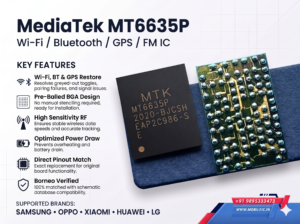
MediaTek MT6635P Wi-Fi / Bluetooth / GPS / FM Connectivity IC (Original BGA)
SEO & Catalog Metadata
- SEO Title: MT6635P MediaTek Wi-Fi & Bluetooth IC – Samsung A34, Oppo Reno 2Z/4Z, Redmi 10X
- Product SKU: IC-MTK-MT6635P
- Category: Mobile ICs > Wi-Fi & Bluetooth ICs > MediaTek (MTK)
- Tags: MT6635P, MT6635, MTK WiFi IC, SM-A346 WiFi IC, Reno 2Z WiFi IC, Redmi 10X WiFi IC, Borneo Schematics Compatible, Micro BGA Reballing
Product Summary
The MediaTek MT6635P is a high-performance, single-chip wireless combination controller responsible for Wi-Fi (WLAN), Bluetooth (BT), Global Navigation Satellite Systems (GNSS/GPS), and FM radio communications in MediaTek-based smartphones.
This original factory-tested BGA IC is an exact replacement for motherboards exhibiting common connectivity circuit failures, including greyed-out Wi-Fi toggles, Bluetooth initialization timeouts, satellite signal dropouts, and secondary line VDD power shorts.
Key Product Highlights
- OEM Specification Matching: Matches factory clock frequency, RF power amplifier stages, and baseband logic protocols.
- Pre-Balled BGA Layout: Supplied with uniform, lead-free/low-melt micro solder balls for accurate board placement and reliable reflow bonding.
- Borneo Schematics Verified: 100% verified cross-compatibility mapped with official hardware schematic databases.
- Solves Common Board Shorts: Direct fix for leaking or shorted RF decoupling caps around the connectivity power rails.
1. Verified Borneo Schematics Compatibility List
Hardware-tested and confirmed across the following smartphone logic boards:
| Brand | Model Name | Model / Board Code | IC Function |
| Samsung | Galaxy A34 5G | SM-A346 / SM-A346B / SM-A346E | Wi-Fi / BT / GPS Controller |
| Samsung | Galaxy M53 5G | SM-M536B / SM-M536B/DS | Wi-Fi / BT / GPS Controller |
| Oppo | Reno Z | PCDM10 / CPH1979 | Wi-Fi / BT / GPS Controller |
| Oppo | Reno 2Z | PCKM10 / CPH1989 | Wi-Fi / BT / GPS Controller |
| Oppo | Reno 4Z 5G | CPH2065 | Wi-Fi / BT / GPS Controller |
| Oppo | A92s | PDKM00 | Wi-Fi / BT / GPS Controller |
| Xiaomi / Redmi | Redmi 10X 5G | M2004J7AC | Wi-Fi / BT / GPS Controller |
| Xiaomi / Redmi | Redmi 10X Pro | M2004J7BC | Wi-Fi / BT / GPS Controller |
| Huawei | Maimang 9 | TNN-AN00 | Wi-Fi / BT / GPS Controller |
| LG | Velvet 5G (MTK) | LM-G910 / Series | Wi-Fi / BT / GPS Controller |
(Note: Always verify your logic board schematic, component part number, and pinout architecture in Borneo Schematics before placement.)
2. Technical Specifications & Markings
| Parameter | Specification Details |
| Manufacturer | MediaTek (MTK) |
| Primary Part Number | MT6635P |
| Complete Surface Laser Code | MTK MT6635P 2020-BJCSH EAP2C986-S E |
| Package Architecture | Micro WLCSP / BGA (Ball Grid Array) |
| Supported Protocols | Dual-Band Wi-Fi (2.4 GHz / 5 GHz 802.11 a/b/g/n/ac), Bluetooth 5.x Low Energy (BLE), GNSS (GPS, GLONASS, Galileo, BeiDou), FM Rx |
| Pin 1 Orientation | Laser-etched indexing dot (lower-left quadrant relative to orientation text) |
| Condition | Brand-new / Factory reflow-ready with micro solder balls |
3. Fault Symptoms & Diagnostic Guide
This IC is the primary suspect when troubleshooting the following hardware issues:
A. Wi-Fi Circuit Symptoms
- Greyed-Out Wi-Fi Switch: The Wi-Fi toggle in settings is faded, unclickable, or automatically snaps back to “OFF” within 2 seconds of toggling.
- Wi-Fi Address Missing: “Wi-Fi MAC Address” displays as 02:00:00:00:00:00, Unavailable, or blank in Android “About Phone” status.
- Zero SSIDs Detected: The switch enables, but the device continuously scans and fails to locate any 2.4 GHz or 5 GHz wireless networks even right next to a router.
B. Bluetooth Circuit Symptoms
- Bluetooth Failure: Bluetooth will not turn on, drops connection after a few seconds, or will not discover audio devices/wearables.
- Bluetooth Address Unavailable: Device Bluetooth MAC address is null or missing in system info.
C. GPS & Location Issues
- No Satellite Lock: Maps apps show “Searching for GPS” indefinitely or place the blue dot miles away with wide inaccuracy circles.
D. Motherboard Electrical & Standby Faults
- Heat at Connectivity Shielding: The EMI shield covering the MT6635P warms up immediately upon boot-up or when attempting to toggle connectivity options.
- Battery Drain / Secondary Line Short: Short to ground detected on the local power supply rails (VDD_WIFI, VIO_1.8V, or VBAT_WIFI), preventing the device from entering deep sleep.
4. Recommended Rework & Soldering Temperature Profile
Note: The values below are intended for experienced micro-soldering technicians using calibrated equipment and proper nozzle sizing.
[Pre-Heat Phase] [Reflow Peak] [Settling / Bonding]
180°C – 200°C (30-45s) —> 340°C – 360°C (Air 40-50) —> Surface Tension Auto-Align
- Chip Removal:
- Shield surrounding sensitive components (CPU, UFS/EMMC, cameras) with high-temperature polyimide tape or heat-dissipating copper foil.
- Heat evenly across the IC shield area at 330°C – 350°C (airflow: 40–50%).
- Lift gently with precision curved tweezers once all solder balls have fully liquified. Do not use excessive force to prevent lifting board pads.
- Pad Preparation:
- Clean old solder with a chisel-tip iron and copper solder wick at 340°C.
- Ensure all PCB pads are completely smooth, level, and free of residual underfill or carbon buildup.
- Clean thoroughly with high-purity Isopropyl Alcohol (IPA) or electronic circuit cleaner.
- Installation & Reflow:
- Apply a thin, uniform coat of high-grade BGA soldering flux across the board pads (avoid heavy application to prevent chip drift).
- Align the IC according to the PCB silk-screen corner markers and Pin 1 orientation dot.
- Reflow vertically at 340°C – 360°C with low-to-medium airflow until the IC naturally settles into place by surface tension.
- Allow the PCB to cool naturally to room temperature before testing line resistances.
5. Frequently Asked Questions (FAQ)
Q: Does the MT6635P require firmware programming or flashing after installation? A: No. The MT6635P is a hardware transceiver controller. It does not contain an independent programmable firmware ROM that requires external programming boxes. The MediaTek main processor automatically communicates with and configures the IC during OS boot-up.
Q: Can a malfunctioning MT6635P prevent the phone from booting completely? A: Yes. If the internal silicon of the MT6635P suffers a dead short across a primary system power rail (like VPH_PWR or VIO_1.8V), it can clamp the entire system voltage down, causing a 0.05A–0.15A boot loop or a total dead-boot condition on a DC power supply. Removing the shorted IC typically restores device boot functionality.
Q: Are the solder balls already applied on the chip? A: Yes. The chip comes pre-balled with high-precision micro solder balls, ready for direct alignment and reflow soldering.
Package Includes:
- 1 × MediaTek MT6635P Wireless Connectivity BGA IC (Sealed, anti-static protective tape packaging)


Leave a Reply